 Issue tracker

Issue tracking with workflows, sprints, SLAs and team roles, in your browser.
Trackwell is a ticket and issue tracker for software teams, IT service desks and anyone with a backlog: projects with keys like WEB-123, seven issue types, your own fields and workflows, scrum and kanban boards, a query language, dashboards and business-hour SLAs. It works locally without an account, and with Teamspaces your team shares projects live with admin, member, viewer and guest roles — guests can submit requests and see only their own.
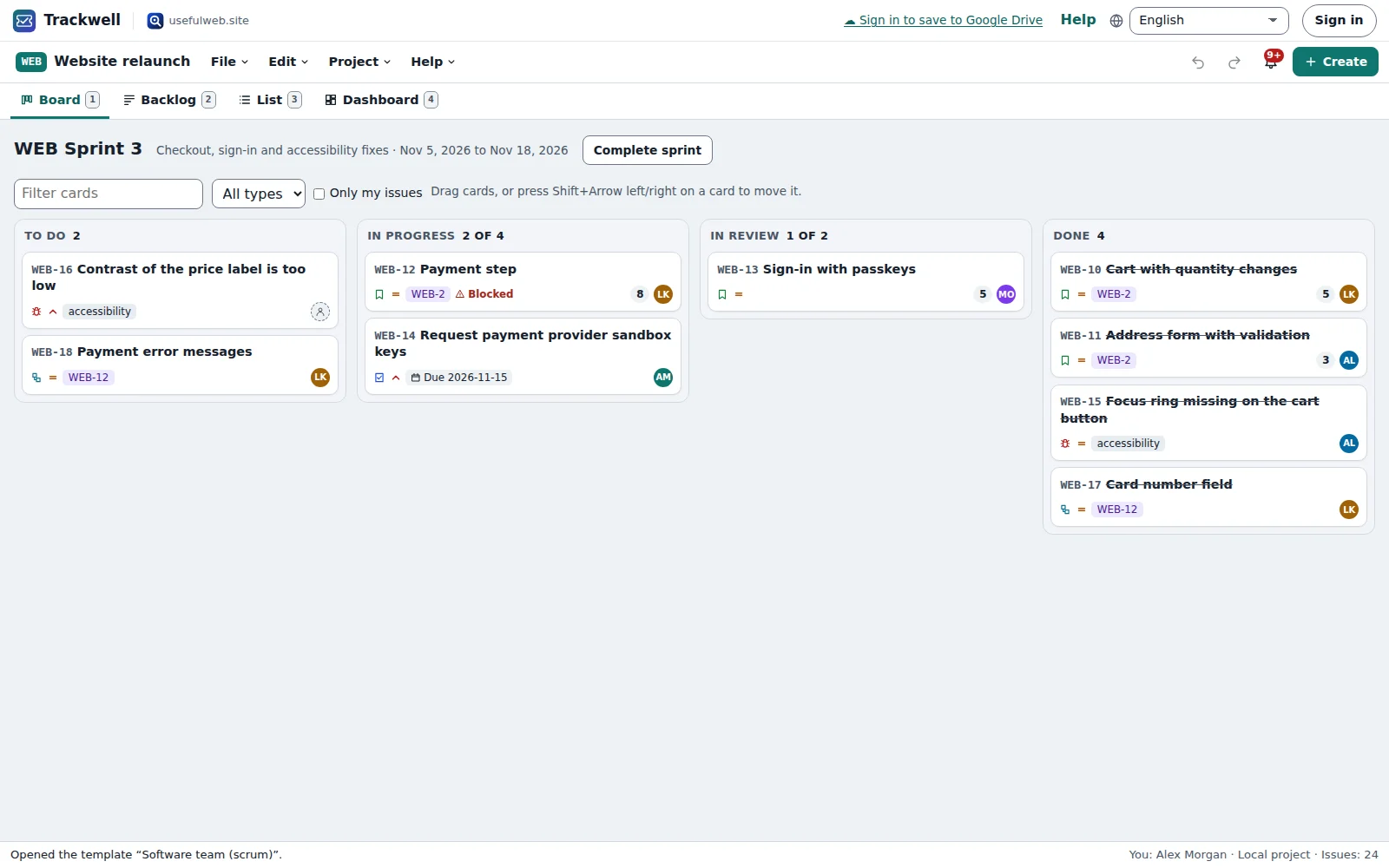
Screenshots
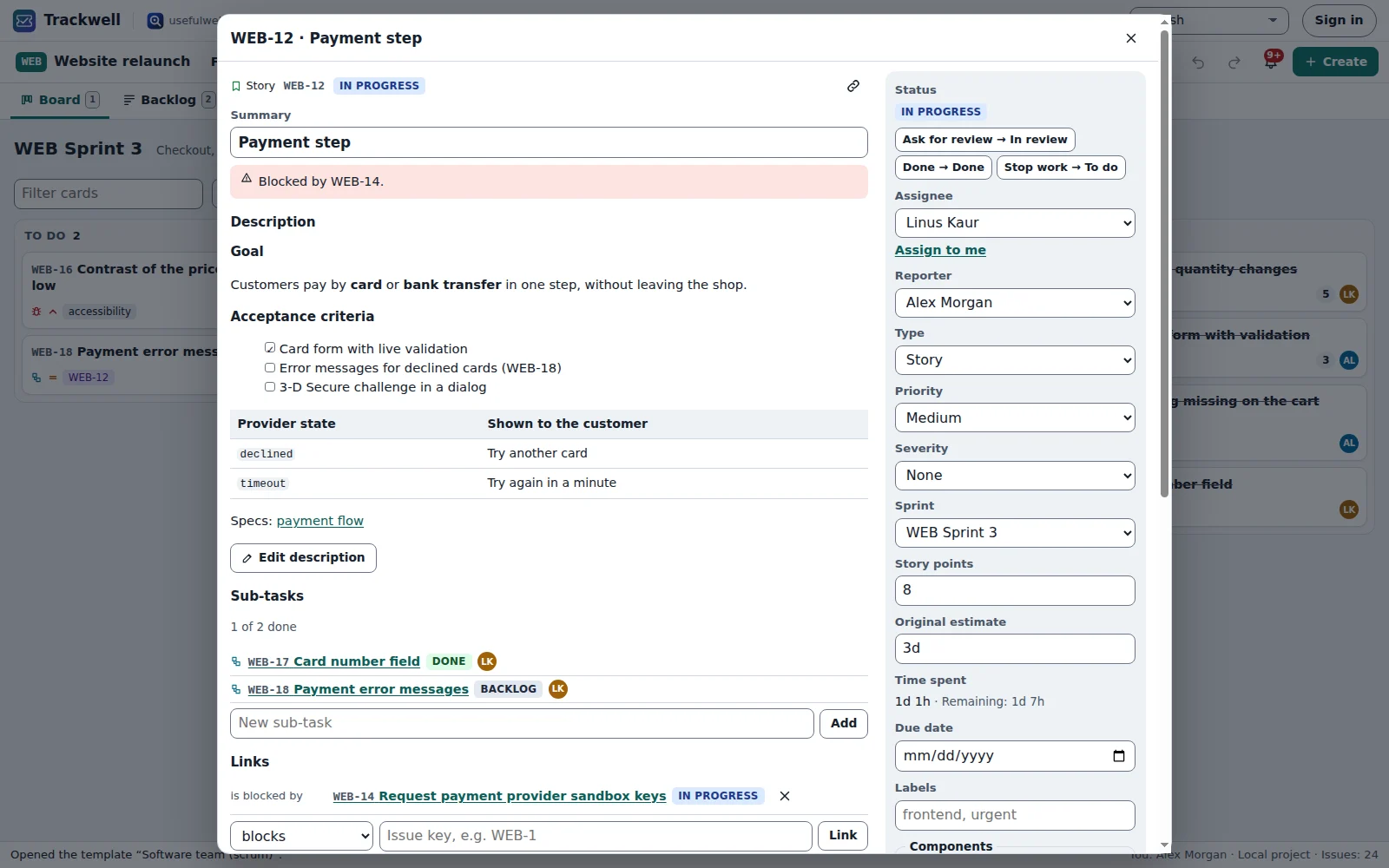
Features
Projects, keys and issue types
Each project has its own key (WEB-123) and uses tasks, bugs, stories, epics, sub-tasks, incidents and requests.
Fields you choose
Priority, severity, components, labels, fix versions, due dates, estimates, story points and custom text, number, select, person or date fields.
Your own workflow
Statuses, allowed transitions and rules such as required fields, a resolution or a role — in a visual editor that also works by keyboard.
Scrum and kanban boards
A backlog with sprints you plan, start and complete with carry-over, or a kanban board with WIP limits. Drag cards or move them by keyboard.
Query language and saved filters
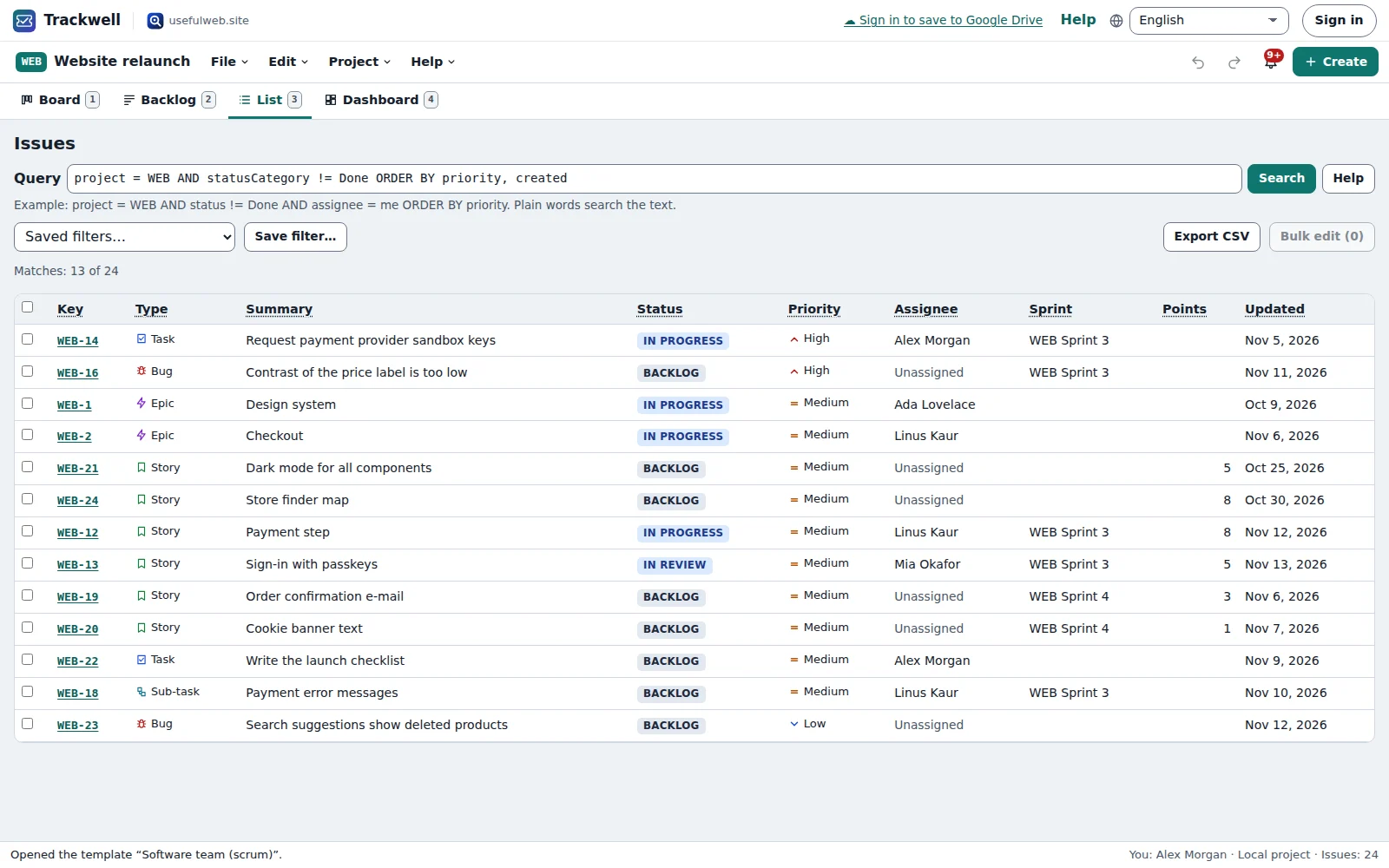
Write project = WEB AND status != Done AND assignee = me ORDER BY priority, save it, bulk-edit the result or export it.
Everything on the issue
Markdown description, comments with @mentions, activity history, watchers, links, sub-tasks, attachments and a work log.
SLA timers in business hours
Response and resolution targets for incidents and requests, with working days, holidays and a pause while you wait for the customer.
Request portal for guests
Guests submit requests through a form and see only their own, with status and replies from the team.
Teamspaces roles
Admins, members, viewers and guests from your workspace, with per-project access rules, live updates and presence.
Dashboards
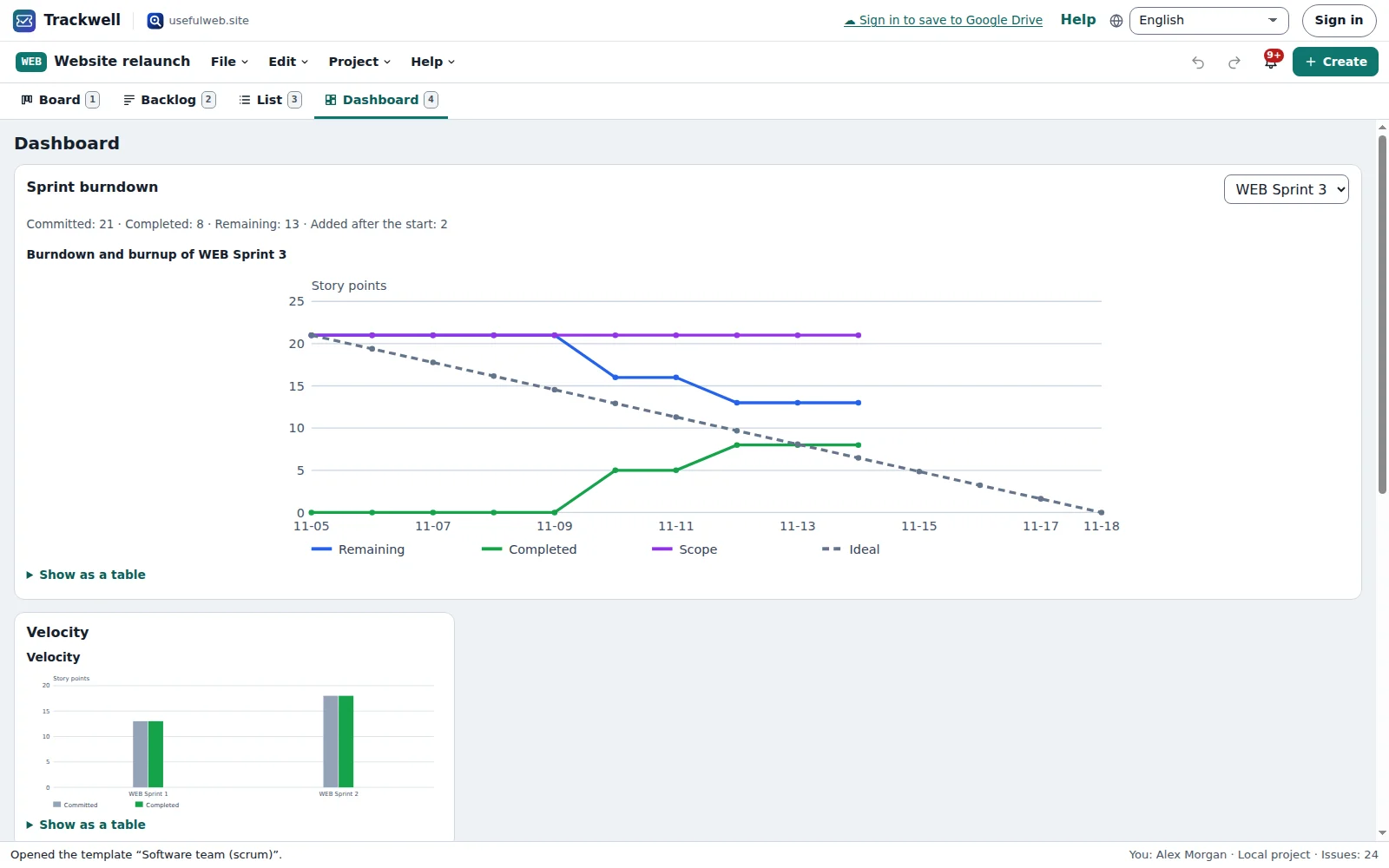
Created vs resolved, burndown and burnup, velocity, cycle time, SLA breaches and workload per person, each chart with a table.
Notifications in the app
See when you are assigned or mentioned, when watched issues change and when an SLA is missed. No e-mails.
Time logging to Timeslice
Log work on issues and send the time sheet to Timeslice, or export it as CSV.
Jira CSV import, CSV export
Bring issues from a Jira CSV export with a mapping report, and export any filter as CSV.
Keyboard first
C creates an issue, / searches, J and K move through lists, and every board move has a keyboard way.
Local-first, no account needed
Without signing in, projects autosave in this browser with files, undo and redo. Back them up with Bundlekeep.
API and MCP tools
Four tools filter issue lists with the query language, compute SLA due times, draw burndowns and import Jira CSV.


Templates
Start from a ready-made project and change it to fit.
Software team (scrum)
A website relaunch with epics, stories, bugs and sub-tasks, two finished sprints, an active sprint with a burndown and a planned one.
Kanban team
An operations team pulling work through Backlog, Selected, Doing, Review and Done with WIP limits.
IT service desk
Incidents and requests with business-hour SLAs, a “waiting for customer” pause, a request portal for guests and custom fields.
Bug tracker
Bugs with severity, components and fix versions; triage needs a severity and a component, fixes are verified before closing.
Personal tasks
A three-column board for your own to-dos with due dates, labels, sub-tasks and time logging.
Built-in tools
Trackwell uses these tools. Each one also has its own page and works on its own, in the browser, through the JSON API and through MCP.
- Trackwell Query Filter Trackwell engineFilter an exported issue list with a JQL-style query: status, assignee, dates, ORDER BY.
- Trackwell SLA Calculator Trackwell engineWhen is a ticket due in business hours? Working days, holidays, pauses and breaches.
- Trackwell Sprint Burndown Trackwell engineSprint burndown and burnup from a Trackwell project or a table of sprint items.
- Trackwell Jira CSV Import Trackwell engineTurn a Jira CSV export into a Trackwell project: issues, statuses, sprints, people.
For AI agents
Trackwell runs on a deterministic engine. The same functions are available as tools with a JSON API and MCP, so scripts and AI agents get exactly the results the app shows.
- Trackwell Query Filter – Filter an exported issue list with a JQL-style query: status, assignee, dates, ORDER BY.
Tool page ·POST https://trackwell.usefulweb.app/api/v1/tools/trackwell-jql-filter/calculate· MCPtrackwell_jql_filter - Trackwell SLA Calculator – When is a ticket due in business hours? Working days, holidays, pauses and breaches.
Tool page ·POST https://trackwell.usefulweb.app/api/v1/tools/trackwell-sla-calculator/calculate· MCPtrackwell_sla_calculator - Trackwell Sprint Burndown – Sprint burndown and burnup from a Trackwell project or a table of sprint items.
Tool page ·POST https://trackwell.usefulweb.app/api/v1/tools/trackwell-burndown/calculate· MCPtrackwell_burndown - Trackwell Jira CSV Import – Turn a Jira CSV export into a Trackwell project: issues, statuses, sprints, people.
Tool page ·POST https://trackwell.usefulweb.app/api/v1/tools/trackwell-jira-csv-import/calculate· MCPtrackwell_jira_csv_import
- MCP endpoint (Streamable HTTP):
https://trackwell.usefulweb.app/mcp - Project file format (JSON Schema): https://trackwell.usefulweb.app/project.schema.json
- OpenAPI description: /openapi.json · llms.txt · API & MCP
Build a project through the API, then open it in the app with a link to https://trackwell.usefulweb.app/app#project=<base64url JSON>.
Import & export
Import
- Trackwell project (.trackwell.json)
- Jira CSV export (all fields)
- Trackwell CSV export
- Teamspaces documents (shared projects)
Export
- Trackwell project (.trackwell.json)
- Issues as CSV (Jira-compatible columns)
- Work log as CSV for Timeslice
- Charts as SVG
- Archive documents of resolved issues
Keyboard shortcuts
| Keys | Action |
|---|---|
| C | Create an issue |
| / | Search: focus the query bar of the list view |
| J / K | Next / previous issue in the list or on the board |
| Enter | Open the focused issue |
| Shift + Arrow left / right | Move the focused board card to the previous / next column |
| Alt + Arrow up / down | Move the focused backlog issue up or down |
| 1 / 2 / 3 / 4 / 5 | Board, backlog, list, dashboard or requests view |
| Ctrl + Z | Undo |
| Ctrl + Shift + Z | Redo |
| Ctrl + S | Save project file |
| ? | Show keyboard shortcuts (single-key shortcuts can be switched off there) |
Frequently asked questions
Do I need an account?
No. Without signing in, Trackwell keeps your projects in this browser and you can save them as files. Sign in with a passkey or Google only when you want to share a project with a team.
How do roles work in a shared project?
Trackwell uses your workspace roles: owners and admins manage the project and its settings, members create and edit issues, viewers only read, and guests only use the request portal. You can give single people or roles more or less access per project in Share and permissions.
What can a guest see?
A guest gets a personal request inbox for the project: the form to submit requests and the status of their own requests, with replies from the team. Guests never see the project, other requests or other people’s issues.
What happens when two people edit at the same time?
Changes are saved within a second and appear for everyone else live. If two saves overlap, Trackwell merges them issue by issue and field by field; only when both changed the same field of the same issue does the later one win, and you are told which.
How do I move from Jira?
In Jira, export your issues as CSV with all fields. In Trackwell choose Import → Jira CSV, check the mapping of types, statuses and columns, and import. Attachments and change history are not part of Jira’s CSV export.
How are SLA times counted?
Only during the working hours of working days that are not holidays, in the time zone offset you set. Statuses marked “pause SLA”, such as waiting for the customer, stop the clock.
How big can a project get?
Up to 5000 issues per project. Shared projects are stored as one workspace document of at most 2 MB; when a project gets close, Trackwell offers to move resolved issues into archive documents.
Limitations
What Trackwell does not do (yet):
- No e-mail notifications or e-mail-to-ticket: notifications live inside the app.
- Project roles follow the workspace roles and per-project access rules; transition role rules are checked in the app, not by the server.
- SLA calendars use a fixed UTC offset; daylight saving changes are not applied automatically.
- A shared project is one document (at most 2 MB); very large projects need resolved issues moved to archive documents.
- No swimlanes, roadmaps/timelines or automation rules yet.
- Jira CSV imports cannot bring attachments, full work logs or change history, because Jira’s CSV export does not contain them.
Tutorials
Learn Trackwell step by step.
- Your first project in five minutesOpen a Trackwell template, find your way around the board, create issues with the C key and keep your project in this browser or in a file.Beginner 5 min
- Issues in detail — descriptions, comments, links and timeWrite Markdown descriptions, mention people in comments, link and split issues, watch them, log your time and attach files in Trackwell.Beginner 7 min
- Backlog, sprints and the burndown chartOrder the backlog, plan a sprint, start it, complete it with carry-over and follow its progress on the burndown, burnup and velocity charts.Intermediate 7 min
- Queries, saved filters and bulk editFind issues with Trackwell's query language, save the queries you need every day, edit many issues at once and export the result as CSV.Intermediate 6 min
- Workflows, fields and SLA timersDesign your own statuses and transitions with the keyboard-accessible workflow editor, add custom fields and set business-hours SLA targets for incidents and requests.Advanced 8 min
- Teamspaces, roles and the request portalShare a Trackwell project with your team in a workspace, understand who may do what, work at the same time on the same project and let guests submit requests.Intermediate 8 min
- Jira import, CSV and TimesliceMove issues from Jira into Trackwell with a CSV export, export issues as CSV, send your work log to Timeslice and read the dashboard charts.Intermediate 6 min
Ready to try it?
Other apps
-

Twinworks
Factory digital twin & production simulation
Model a production line, simulate it and find the bottleneck — free, in your browser.
-

Chainscope
Web3 investigation desk
Investigate transactions, bridges, contracts, DAOs and wallets in one case file.
-

RavingDesk
Paper trading & data workspace
Practise trading on paper and chart your data: orders, risk, datasets, analyses, reports.
-

Lumina
Photo editor & image toolkit
Bring out what you saw. A free photo studio, right in your browser.
-

Learning Shorts
Animated explainer video studio
Turn an idea into a narrated, animated short video with presenters, props and captions.
-

Ledgerly
Household finance & life-admin desk
Budgets, bills, subscriptions, loans, contracts and deadlines on one private desk.
-

Ohmforge
Virtual electronics workbench
Draw a circuit, switch it on, and measure it with real-feeling bench instruments.
-

Flipline
Drawing, storyboards & animation
A few drawings. A little life. Make a flipbook in your browser.
-

Soundscape Atlas
Sound map & ambience studio
Find real field recordings on a world map and mix them into calm, editable soundscapes.
-

Hearth
Home & travel planner
Plan meals, chores, home care, moves, trips and good days for your household in one place.
-

Playcards
Card games table
33 card games from Skat and Jass to Scopa and Daifugō, vs the computer, at home or online.
-

Kerfwise
Cabinet & furniture CAD
Design cabinets and furniture, get cut lists, optimised sheet layouts, costs and drawings.
-

Proofline
Math notebook
Solve, graph, test and visualise in one notebook — with data, findings and a report.
-

ObscurIQ
OSINT case desk
Organize public-source research: cases, a research log, pivots and indicators.
-

Reelcraft
Audio, video & image batch studio
Audio, video & image batch studio: cut, convert, compress, subtitle, reframe
-

Signalhouse
Website & internet infrastructure inspector
Inspect DNS, TLS, mail, CDN and routing of all your domains — and see what changed.
-

Opsdeck
Developer & ops workbench
One deck for CI failures, cron, traces, k8s events, API diffs, query plans and Terraform.
-

Paperwell
Document studio: PDFs, OCR, redaction, forms & contract reading
Your paperwork in one dossier: PDF tools, OCR, redaction, forms and contract reading.
-

Renderloom
3D scene & material studio
Shape a scene. Find its light. Keep every idea editable.
-

Keysmith
Crypto & secrets lab
Audit certificates, keys, TLS and passwords in one lab; secrets stay on your device.
-

Fieldday
Sports club & training organiser
Fixtures, brackets, ratings and training plans for your club — in one workspace.
-

Threadsmith
Embroidery digitizing studio
Draw or import artwork, turn it into stitches, export DST, PES, JEF or EXP files.
-

Agentlab
AI-agent & LLM workbench
Test an AI agent before release: permissions, traces, costs, citations and output checks.
-

Provenance
Software supply-chain security desk
SBOMs, CVEs, containers and licences in one risk register — free, in your browser.
-

Pageboard
Website inspiration boards
Collect website references, sort them with tags and arrange them on a moodboard.
-

Panelcraft
Comic books & figure references
Shape a page. Arrange a book. Give your story a voice.
-

Tonegrid
Tone matrix & beat sequencer
Light up squares to build melodies, beats and acid bass, then arrange them into songs.
-

Bundlekeep
Local project backup
Back up projects from every usefulweb app into one file, check it and restore any part.
-

Kinetica
Robot motion studio
Simulate robot arms in your browser: kinematics, trajectories, collisions, program export.
-

Printshop
Printables studio
QR codes, calendars, labels, puzzles and posters — print-perfect PDFs in seconds.
-

Cartograph
Map posters, route art & atlas
Map prints, GPS-art routes, fair meeting points, true sizes, flags and country quizzes.
-

Skyfold
Sky & space atlas
See the sky of any place and moment, plan eclipses and satellite passes, print star maps.
-

Focus Room
Ambience player & focus timer
A calm room for your screen: ambience, slow visuals, focus timers, clocks and big signs.
-

Sizewise
Scale & big-number visualiser
Make sizes, amounts and big numbers feel real: to-scale lineups, fit counts and stacks.
-

Deckwright
Slide deck studio
Write Markdown, get an accessible slide deck — charts, diagrams, PDF, HTML and PowerPoint.
-

Laneboard
Kanban boards
Kanban boards in your browser: lists, cards, checklists, due dates and flow charts.
-

Timeslice
Time tracker & timesheets
Track time on your own tasks, see where it went in charts and share a read-only report.
-

Wikinest
Knowledge base and team wiki
A team wiki: spaces, page trees, versions, comments and permissions per space.